
Choose Your AI Model
Start with GPT-5.4 Free or switch to another model based on the kind of help you need.
Stop switching between tools for every question. HeyTop AI Chat gives you a clean place to ask, think, write, research, and create with GPT-5.4 Free, Claude Opus 4.7, and other leading AI models when you need more power or a new perspective.
Loading models…
Getting better answers takes just a few seconds. Choose a model, type your question, and let AI Chat help you turn ideas into results.

Start with GPT-5.4 Free or switch to another model based on the kind of help you need.
Enter a question, task, or idea to get help with writing, research, problem solving, or everyday work.
Review the response, refine your prompt, or continue the conversation until you get closer to the result you need.
Different tasks need different strengths. HeyTop AI Chat brings together leading models, so you can choose the one that best fits your work, writing, research, and everyday use.
Start with fast, flexible models for daily questions, quick help, and general AI conversations.

A simple way to start with GPT-5.4 on HeyTop for everyday AI chat and quick help.
Try in AI Chat
A DeepSeek V4 model for fast, everyday AI chat within the official V4 lineup.
Try in AI Chat
A general AI model from the GLM family for everyday chat and assistant-style use.
Try in AI ChatChoose these models when your task needs stronger thinking, longer context, or more support for writing, coding, and research.
Designed by OpenAI for professional work, with support for reasoning, coding, and agentic workflows.
Try in AI ChatA more advanced DeepSeek V4 option with official support for thinking mode and reasoning control.
Try in AI Chat
Google positions Gemini 3.5 Flash for sustained performance on agentic and coding tasks.
Try in AI Chat
Moonshot positions Kimi K2.5 for dialogue and agent tasks, with multimodal input, long context, and deep reasoning support.
Try in AI ChatUse these models for higher-demand tasks, complex workflows, and more advanced problem solving.

Anthropic positions Claude Opus 4.7 for advanced software engineering, complex long-running tasks, and higher-fidelity vision work.
Try in AI ChatOpenAI positions GPT-5.5 for agentic coding, knowledge work, and scientific research, with stronger overall capability.
Try in AI Chat
Positioned by MiniMax for coding and agent tasks, with strong reasoning in fast, responsive workflows.
Try in AI ChatNot sure which one to choose? Start with GPT-5.4 Free.
Use AI Chat Assistant to ask questions, write, summarize content, and keep improving responses in the same conversation.
Whether it is an everyday question or a complex problem that requires judgment, HeyTop AI Chat Assistant combines web access to help you get clearer answers faster, understand the issue more efficiently, and move on to the next step.
Ask Now
Throw rough ideas, short prompts, or messy notes into AI Chat Assistant, and it can quickly turn them into emails, posts, outlines, and polished drafts, helping you complete writing, study, and content creation tasks faster.
Start Writing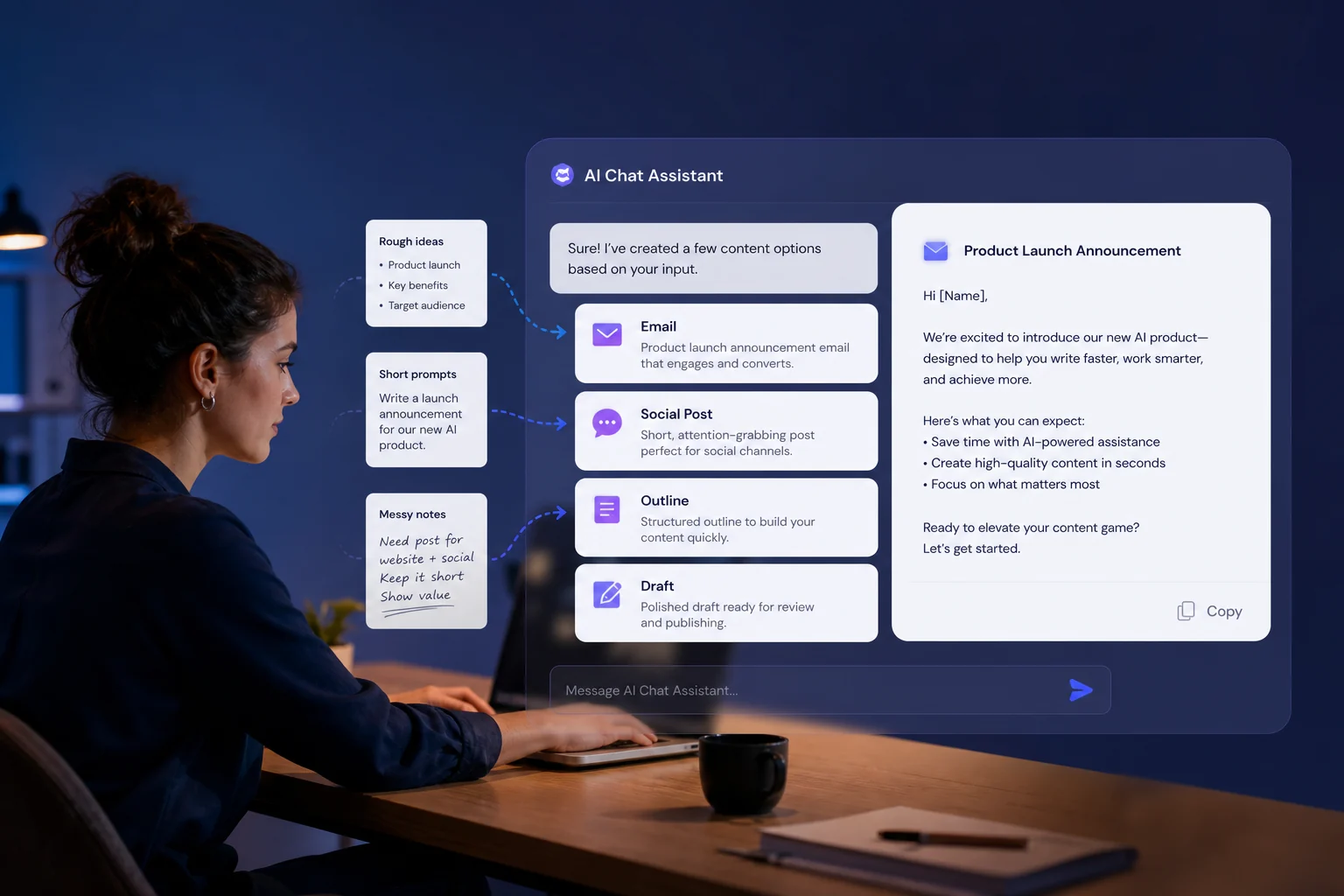
Whether it is long articles, lengthy notes, research materials, or complex explanations, AI Chat Assistant helps you quickly grasp the key points, so you spend less time reading and more time understanding and handling what really matters.
Start Summarizing
You can continue asking follow-up questions, add more requirements, and adjust the direction around the same topic, so the response gets closer to your goal step by step without needing to start over each time.
Keep Exploring
Access GPT, Gemini, DeepSeek, Kimi, and other popular models in one chat space without constantly switching platforms.
No downloads or complicated setup. Just go online and start using it.
Begin with free access, then explore more models and capabilities as needed.
Handle questions, organization, and content tasks in one place with less back-and-forth.
Real User Reviews of The AI Chat Assistant
SBSophie Bennett | Content Marketer
“When I need to write headlines, organize outlines, or improve copy, I open HeyTop AI Chat Assistant first. It helps me move faster without starting from a blank page.”