
Every October, the urge to post an incredibly spooky, cinematic visual hits—but reality quickly sets in. Nailing a true Halloween aesthetic traditionally means hours struggling with SFX makeup, buying expensive costumes you’ll only wear once, or trying to shoot moody, low-light videos that just end up looking like a blurry mess on your phone.
AI filters promise an easy shortcut, yet if you’ve ever typed “make me a vampire” and ended up with a generic, cartoonish face that looks nothing like you, you know the frustration.
The secret to scroll-stopping seasonal content isn’t just having the right AI tool; it’s knowing exactly how to direct it. Instead of leaving the atmosphere to chance, this guide will show you how to take a simple, everyday photo and use structured prompts to transform it. Whether you want to apply digital gothic makeup without losing your recognizable features, or animate a static portrait into a suspenseful video, you’ll learn the exact formulas to bring your darkest ideas to life
AI Halloween Filter Online: From Text-Based Concepts to Photo Restyling and Video
Translating a spooky concept from sheer imagination into polished visuals requires a reliable, end-to-end creative space. With the AI Halloween filter on HeyTop AI, you can explore three creative workflows:
● Creating Scenes from Pure Text: Craft rich, atmospheric concepts entirely from scratch by describing intricate textures, moody lighting, and distinct Halloween backdrops without needing an initial snapshot.
● Restyling Your Existing Photos: Feed in a casual selfie, portrait, or product photo to instantly overlay gothic costumes and seasonal makeup, effortlessly changing the entire mood while using the reference image to guide facial likeness and subject details.
● Bringing Stills to Life with Motion: Take your freshly rendered Halloween shot and let it breathe by adding ambient environmental effects, flowing fabrics, and gentle character movements to turn a static portrait into a cinematic short.
TYou can start with the workflow that fits your idea; there is no need to use all three. Before generating, check the workspace for current trial-credit availability and generation costs. The next section explains how to turn your idea into a clear prompt and refine the result.
How to Write Halloween AI Filter Prompts for Photos and Videos
Writing Halloween AI prompts starts with a clear editing goal. Decide what should change in your photo, identify the details you want to preserve, and describe the result in visible terms. Once the image looks right, you can use a separate prompt to add movement.
The following steps show how to build and adjust your own prompts, whether you want a subtle makeup edit, a complete costume transformation, or an animated Halloween scene.
1. Plan Your Photo Edit and Keep Your Face Recognizable
Before writing the prompt, choose your editing scope: makeup, clothing, background, or the whole scene. A makeup-only edit needs different instructions from a complete character transformation.
To keep your face recognizable, name the features that matter—such as face shape, eyes, nose, or hairline—instead of relying only on “keep me the same.” Use a clear reference photo with the face visible so you can compare the result afterward.
Match the preservation instructions to your goal. If you want pale fantasy makeup, preserve facial structure while allowing the makeup color to change. If you only want a new background, ask to retain the original outfit and pose. For pets, specify distinctive markings; for products, identify the packaging and printed details that need checking.
2. Build Your Prompt with Specific Makeup, Costume, and Background Details
Use this flexible structure:
Reference subject + features to preserve + desired changes + visual style and setting + framing
For example:
Edit the uploaded portrait while keeping the person’s recognizable facial features and face shape. Add a dark green velvet witch cloak, a pointed hat that leaves the face visible, and subtle smoky eye makeup. Use a candlelit room with a realistic photographic style and waist-up framing.
The prompt describes what the tool should depict: fabric, color, accessories, makeup, and composition. These details communicate more than “make it spooky” alone.
Keep the structure relevant to your task. For a makeup-only edit, describe the face-paint pattern while preserving the clothes and background. For a background replacement, describe the new surroundings and explicitly retain the subject. You do not need to redesign every part of the image.
3. Adapt Your Prompt for Different Halloween Looks and Visual Styles
You can create different filters by keeping the editing scope and preservation instructions, then replacing the styling details.
For a cute Halloween look, try:
An orange knitted sweater, small pumpkin cheek decorations, and a warmly lit autumn porch, with a cheerful expression and soft colors.
For a gothic version, use:
A black velvet outfit, antique silver accessories, dark plum lipstick, and an old mansion hallway.
Keep “realistic photographic style” if you want the result to resemble a photo, or replace it with an illustrated or clay-animation style for a different finish.
Generate each version separately and check the biggest mismatch first. If the outfit is right but the face has changed, revise the identity instructions before adding more decorations. This makes it easier to understand which adjustment improves the result.
4. Turn Your Halloween Photo into a Video with Clear Motion Instructions
To animate a Halloween photo, start with a finished image you have already checked. Review the face, hands, outfit, background, and any product text before using it as the starting frame.
Build your Halloween AI video prompt around:
Starting image + main movement + camera behavior + details to keep consistent
For example:
Animate the uploaded portrait. Keep the face, outfit, and composition consistent. The person blinks naturally while candlelight flickers gently. Keep the camera fixed.
The image supplies the appearance; the prompt explains what happens next. Avoid requesting a new costume or setting unless the transformation itself is your goal.
Choose duration and aspect ratio in the available settings. If the face or objects distort, first reduce the subject’s movement or remove camera motion. Check the revised clip before adding more actions.
5. Review Blocked AI Prompts and Fix Generation Problems
If your Halloween AI prompt is blocked, read the tool’s message before retrying. A content refusal, an inaccurate result, and a technical failure require different responses.
For a content refusal, review the stated reason and describe the intended creative effect directly. A theatrical costume can be expressed through makeup, clothing, and props:
Create a theatrical zombie costume portrait with gray face paint, dark under-eye makeup, and weathered clothing. Keep the face recognizable, without visible wounds or graphic injury.
This describes a non-graphic costume rather than realistic injury. If a scene is rejected, adjust the underlying content where needed instead of hiding restricted wording. No phrasing guarantees approval across every service; use a review or support option for suspected false rejections where available.
If generation finishes but looks wrong, revise the relevant instruction or reference image. If the task fails with an upload, service, or account error, address that issue before rewriting the prompt.
Halloween AI Filter Examples: Applying Creative Ideas to Real-Life Scenarios
Whether you are staging a nostalgic suspense scene, transforming a two-person portrait, or animating a product showcase, you can copy these exact prompts below as a starting point—just tweak the details to fit your own reference photos:
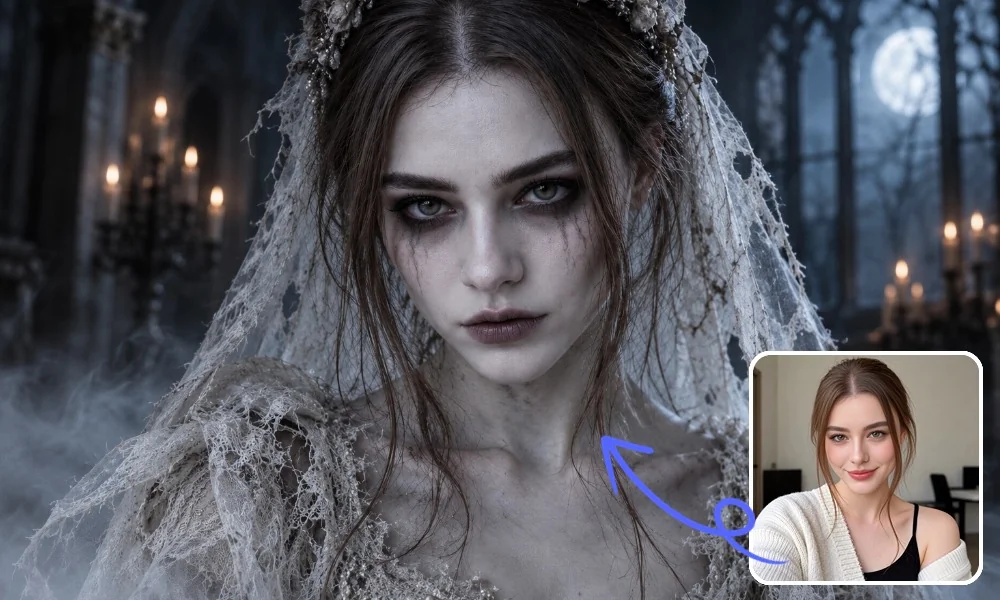
Ethereal Ghost Bride: A Moonlit Bridal Portrait in an Abandoned Chapel
● The Creative Goal: Create an elegant ghost-bride portrait, combining weathered bridal clothing and pale makeup with the quiet unease of an abandoned chapel.
● Reference Image and Composition: Use a clear adult portrait with the face and hairline visible. Let the veil frame the face, with mist around the shoulders rather than across the eyes.
○ Image Prompt: From the provided image, create a photorealistic cinematic Halloween portrait of the adult subject as an ethereal ghost bride, regardless of gender. Preserve their recognizable facial features and face shape. Add pale silver-blue skin tones, softly defined cheek shadows, dark smoky eye makeup, slightly smudged eyeliner, muted pale lips, and a still, distant expression. Dress the subject in vintage bridal clothing with weathered lace, structured fabric, and a torn veil. Let faint mist drift around their shoulders without obscuring the face. Set the portrait in an abandoned chapel with a softly blurred background and cold blue moonlight. Keep the atmosphere ghostly, elegant, and quietly unsettling, with natural skin texture, detailed lace, shallow depth of field, subtle low-light noise, and realistic smartphone nighttime photography.
● What to Check: Compare facial features with the reference. Inspect the veil’s edges near the hairline and shoulders, and check that the mist leaves the lace texture visible.
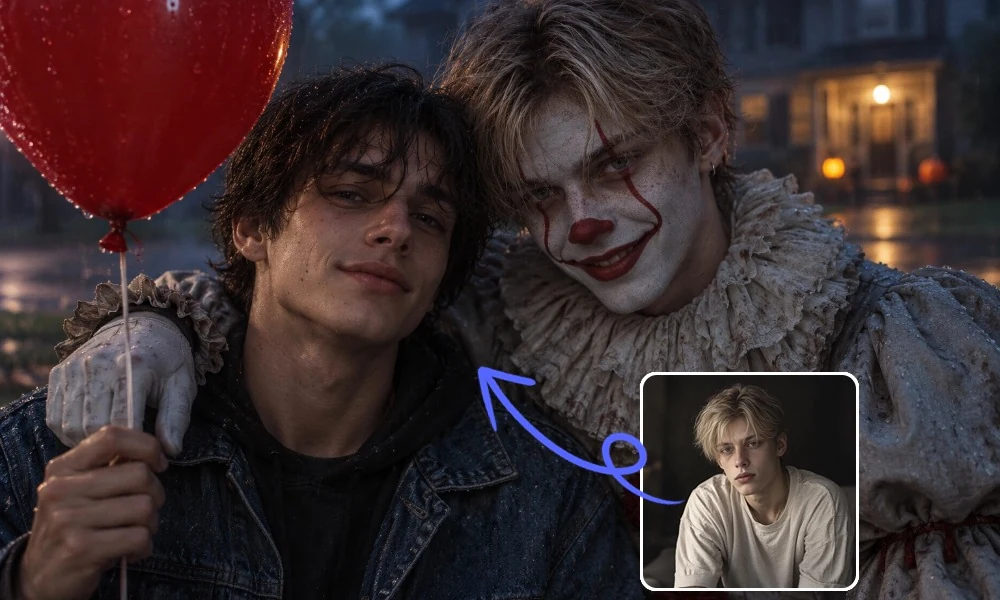
Red Balloon Clown Embrace: One Person, Two Halloween Identities
● The Creative Goal: Stage an unsettling encounter between a person and their clown double, using the embrace and red balloon as the scene’s focal points.
● Reference Image and Composition: Use the same portrait for both identities: the casually dressed figure on the left and the clown on the right. Keep both faces visible.
○ Image Prompt: Create a photorealistic two-person Halloween portrait. In the left foreground, a young man with messy dark brown hair, a dark shirt, and a blue denim jacket holds a red helium balloon and smiles subtly. On his right, a second person hugs him with an arm over his shoulder. Both figures represent the same person. Use the uploaded reference photo for both figures’ recognizable facial features and face shape. Apply white clown makeup, a red nose, red mouth and eye lines, and a sinister grin. Dress them in a worn Pennywise-style costume with a ruffled high collar and pale blue-gray puffed sleeves. Place them outside a softly blurred suburban house at dusk, with humid air, wet asphalt, and cold blue tones. Keep the red balloon prominent on the left, with tiny rain reflections. Close two-person framing, soft natural light, realistic skin and wet fabric, shallow depth of field, subtle low-light noise.
● What to Check: Confirm that both figures resemble the reference beneath their different styling. Check the embracing arm and shoulder contact for merged anatomy, and keep the balloon clear of both faces.
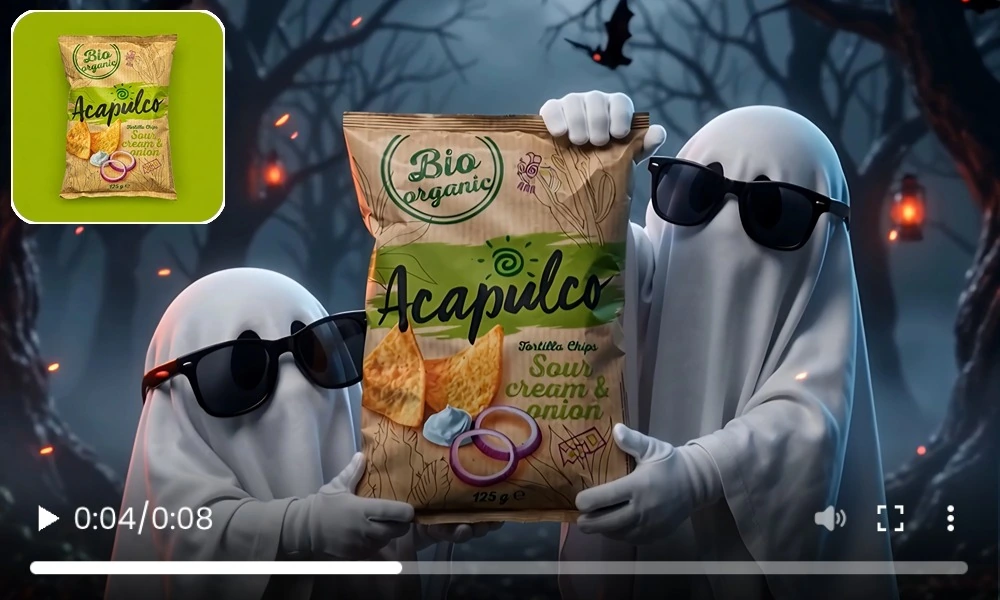
Ghostly Product Showcase: Playful Character Staging for E-Commerce
● The Creative Goal: Create a playful seasonal advertisement in which two sheet ghosts present the product, keeping the merchandise as the visual focus.
● Reference Image and Composition: Use a sharp, front-facing product image with readable packaging. This advanced prompt combines scene creation and animation, with the ghosts positioned on either side of the central product.
○ Video Prompt: Based on this image, generate a hyper-realistic cinematic Halloween photo: a young man standing in the left foreground holding a red helium balloon, with natural highlights and tiny rain reflections on the balloon surface. He has messy fluffy dark brown hair, a clean youthful face, a subtle smile, and wears a dark shirt with a blue denim jacket, looking relaxed and natural. Another person stands on his right, hugging him closely with an arm over his shoulder; this person should preserve the exact facial identity, face shape, and features of the person in the uploaded reference image, transformed only by terrifying clown makeup and costume. Keep the same jawline, eyes, nose, mouth, and overall likeness from the reference image, with heavy white face paint, a red nose, red mouth and eye lines, an exaggerated sinister grin, and intense menacing eyes. Dress him in a worn Pennywise-style clown outfit with a ruffled high collar, pale bluish-gray puffed sleeves, and aged fabric texture. The background is a softly blurred American suburban house and front yard, set in dusk or night with a cold bluish atmosphere, humid air, wet asphalt, and rain-soaked reflective ground. The composition is a close-up two-person portrait, subject centered slightly left, with the red balloon filling the left side of the frame, an intimate yet eerie pose, highly realistic and photorealistic. Natural soft lighting, shallow depth of field, realistic skin texture, wet clothing texture, iPhone-style documentary photography look, realistic exposure, subtle low-light noise, natural colors, cinematic Halloween portrait, ultra-realistic, 8K.
● What to Check: Review the logo, printed text, and packaging edges throughout the clip. Check that the gloves make believable contact without covering important information or deforming the package.
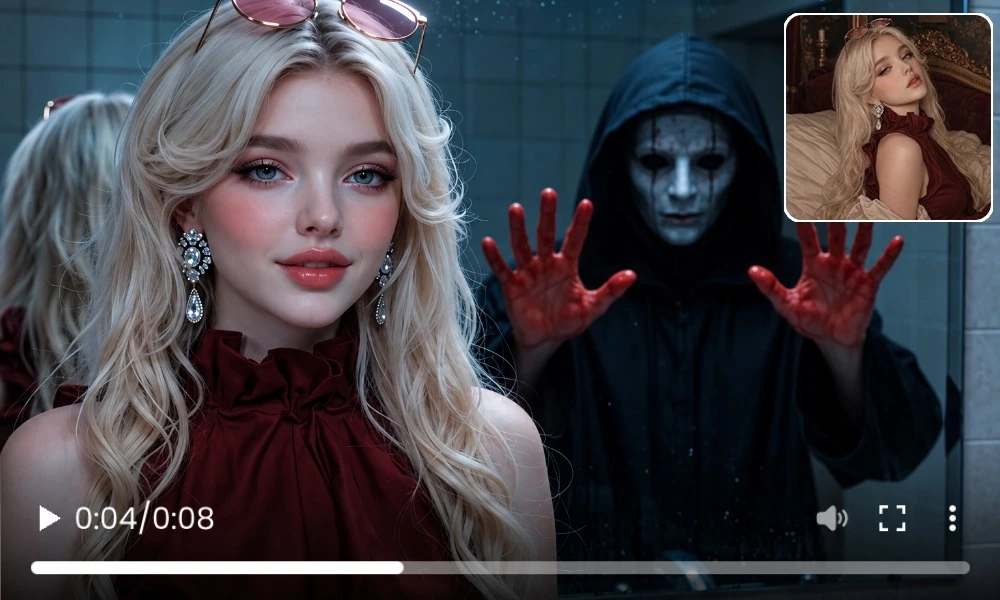
Bloody Hands in the Mirror: An Eerie Presence Takes Shape
● The Creative Goal: Build tension through a figure gradually appearing inside the mirror while the foreground person remains relaxed and seemingly unaware.
● Reference Image and Composition: Start with an image that already shows the person beside a mirror, leaving enough reflection visible for the figure and handprints.
○ Video Prompt: Use the uploaded image as the first frame and preserve its composition. Keep the foreground person’s recognizable identity, hairstyle, skin tone, body shape, clothing, and position. They stand beside a sink or indoor mirror, relaxed with a faint smile. Inside the dark mirror reflection, a figure in a loose black hooded robe and a smooth pale mask gradually appears. It approaches from the reflected darkness, raises both hands stained dark red, spreads its fingers, and presses its palms against the inner glass, leaving faint bloody handprints. Keep the figure entirely inside the mirror, separate from the foreground person. Add a slight head tilt and small finger movements. The foreground person only breathes, blinks, and turns their head slightly. Use a vertical medium shot, subtle handheld movement, and a very slow push-in. Keep the sink, tiles, mirror, and ceiling light realistic. Cold cyan-blue lighting and a faint flicker build tension. End with the smiling person in front and the stained hands pressed against the mirror behind them.
● What to Check: Confirm that the figure and handprints stay within the mirror’s boundaries. Check the foreground person’s blinking, breathing, and slight head movement for unnatural changes, particularly during the camera push-in.
Key Directions: Where Halloween AI Creation Can Go Next
These examples suggest several ways to develop seasonal content beyond an individual effect. The opportunities include building a consistent visual style, extending finished images into related formats, and making more deliberate choices about the results.
1. Visual Consistency Across the Whole Scene: A convincing Halloween look depends on how the subject, costume, makeup, and surroundings work together. This applies to realistic portraits as well as illustrated or playful styles. A shared palette and compatible textures can help the finished scene feel cohesive, whether the goal is an unsettling portrait or a lighthearted product display.
2. Extending a Finished Image into Related Content: An approved seasonal portrait or product shot can serve as a starting point for further creations. The same visual concept may support a static post, an animated clip, or a coordinated series, without requiring every image to become a video. Reusing a finished image as a reference gives creators a basis for keeping those pieces visually connected.
3. Clearer Priorities and More Deliberate Selection: That guidance still needs to be checked against the output. A personal portrait may allow expressive changes, while a product advertisement requires closer attention to packaging accuracy. The intended use helps determine which results are suitable and which need further work.
Developing these ideas depends on choosing results that fit the intended use. The creator’s judgment remains important when deciding whether a scene is convincing, a subject is recognizable, or a product is presented accurately.
Final Thoughts: Start Your Halloween AI Filter Creation with a Clear Idea
Choose one effect you want to create and identify the details that matter most. Use the prompt structure and examples in this guide to make a first version, then review it before expanding the scene or adding movement.
Take an existing photo, identify your stylistic target, and head over to the HeyTop AI Halloween filter tool to try an example or develop your own variation. Start with the result you want to achieve, and refine the prompt as you review each version.